
Sound System Overview
5/28/2026 Update
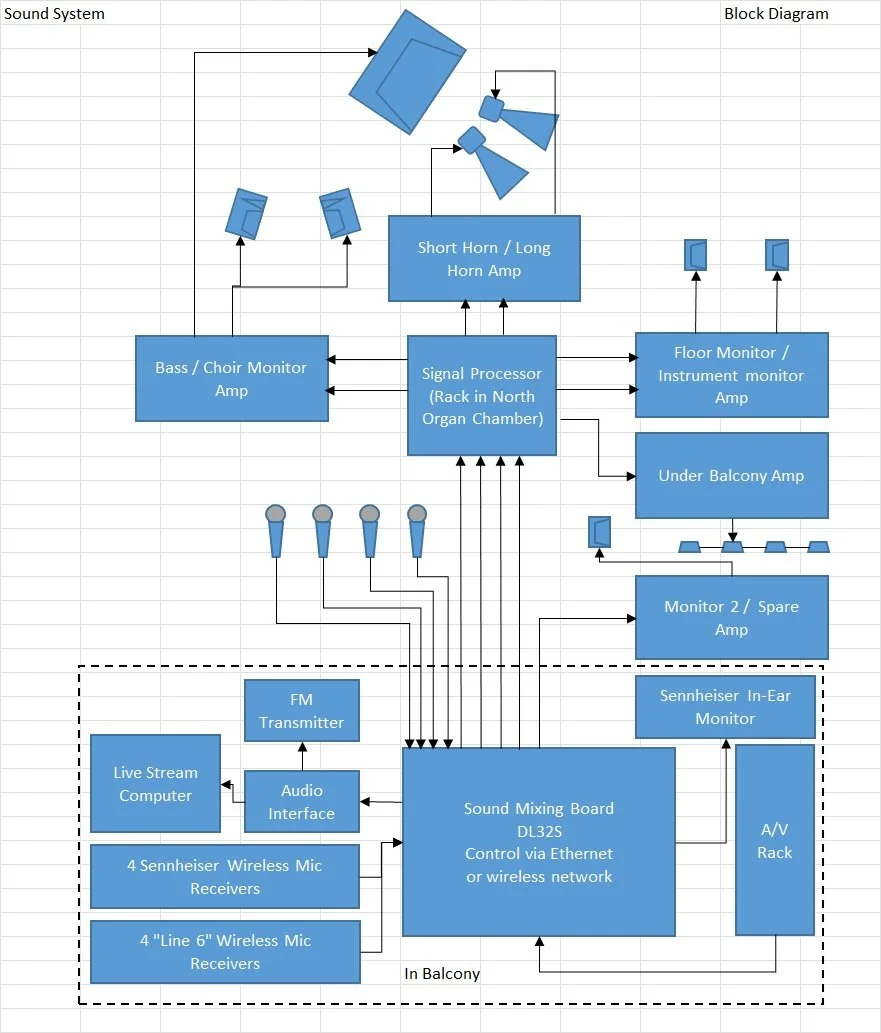
The control center of the Sound System is the DL32S Mixer. This box collects the various inputs, processes them, and then sends the processed signals to other devices, some of which produce sound, and some of which record or send on to other devices. Control of the mixer is possible via WiFi connected devices, such as laptops, tablets or phones, or Ethernet connected devices, such as computers or laptops.
Input devices:
Microphones (32 mic inputs available). We normally use Shure SM57s for instruments, and SM58s for vocals. There are also condenser mics for the choir and the baptistery.
Direct Input boxes (DI boxes) which connect guitars or keyboards to the microphone inputs.
The A/V Switcher/Scaler which routes the audio from the selected A/V input device (computer, DVD, etc.).
Wireless microphone receivers.
Outputs:
LR Live Stream: This stereo feed is sent to an audio interface and then to the live stream computer. It is also broadcast on the micro FM transmitter for hearing support in the auditorium.
A1 MAIN feeds the main speakers (bass, short and long horns) in the house.
A2 Instr (Instrument monitor) is used to provide sound to the pianist (and organist, if a different monitor than Keys is needed). This allows them to stay with a soloist during a performance.
A3 Floor (Floor monitor) is used to provide monitors on the stage, via several monitor jacks.
A4 Choir (Choir monitor) is used during the Traditional service to help the choir hear the piano/accompanists, and the worship leader/speaker. It is set up with a switching jack so that a stage monitor can be plugged in for local use. This disconnects the Choir monitor speakers, which are located in the Organ Speaker Chambers on each side of the Choir.
A5 Mon 2 (AKA Mon 2 Brad) is available as an extra monitor if needed in a Together Service. It is used to serve the drums & bass. This is a recent addition that does not use the Shure signal processor.
AUX 6 (WIEM) may be used to send a monitor mix to a wireless in-ear monitor.
AUX 7 (not currently in use)
AUX 8 (not currently in use)
Signal Flow:
GAIN: This control matches the level of each signal coming into the mixer. If the signal is too low, turning the gain up will boost the signal. If the signal is clipping, turn down the gain. The gain for each channel can be accessed by tapping on the EQ target at the top of the channel, then swiping down three pages.
Live Stream, AUX 1 (MAIN), Aux 2, 3, 4, 5, 6, 7: Each of these screens provide for adjusting the mix to the appropriate device, whether speakers, live stream computer or monitors.
Equalization section (EQ) (Note - Equalization adjustments are a matter of experience and personal preference. Sometimes EQ adjustments can cause unwanted acoustic feedback). Each channel can be EQ’d separately, and each main output can also be EQ’d, but we should not need to EQ the outputs.
OL (red) lightat the top of the fader bar: Indicates clipping - turn down the GAIN control.
PAN: (Above the MUTE button) This control adjusts the relative signal between the left and right channels for Live Streaming. It is normally set to give a sense of the location of the input channel relative to the position on the stage. Some are set for center. Panning inputs left or right can help in discriminating which instrument is producing a sound and is useful for making a good-sounding live stream mix.
MUTE: This button will prevent the sound on that channel from being heard.
SOLO: Allows the operator to listen to one channel only by using the headphone output on the DL32S panel. This is useful in troubleshooting problems, such as finding a noise or hum coming from a particular channel.
FADER: This is a sliding volume control that is used to increase or decrease the individual channel signal to the appropriate output for the page you are on. There is a master fader at the right that sets the overall volume for the output.